Posts

Running two MongoDB instances on one server

Introduction As I am presently learning about MongoDB, I wanted to get some practice with the sharding and replication features of the database, which would require access to at least two running instances of MongoDB. Rather than running two seperate machines or doing something with virtualization, I wanted to keep it simple and get two instances running locally on my Fedora laptop. Here are the steps that I followed to get this working. Note that this tutorial assumes you already have one instance of MongoDB already installed, see my guide here for instructions on that. 1. Make a copy of the MongoDB config file for the second instance $ cp /etc/mongod.conf /etc/mongod2.conf 2. Edit the second file to have different paths and port $ nano /etc/mongod2.conf You should change the file paths for the database storage directory, the log directory, and the port on which the second instance of MongoDB will run, to ensure it does not interfere with the first instance. 3. Copy the...
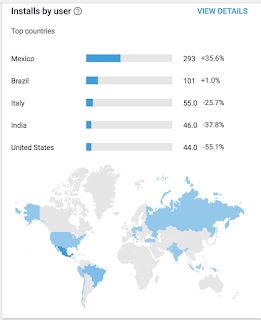
My Android Application users around the world

Image
I Am Proud to say that there are 15000 users in the world using my Application .. Download my apps on below mentioned link APP Link

JAVA STREAMS INTRESTED TO LEARN

IntStream. rangeClosed ( 0 , 10 ).forEach(num -> System. out .print(num));   Output   0 1 2 3 4 5 6 7 8 9 10     IntStream. range ( 0 , 10 ).forEach(num -> System. out .print(num)); O/P 0 1 2 3 4 5 6 7 8 9 Stream. of ( "This" , "is" , "Java8" , "Stream" ).forEach(System. out ::println); O/P This is Java8 Stream String [] stringArray = new String [] { "Streams" , "can" , "be" , "created" , "from" , "arrays" }; Arrays. stream (stringArray).forEach(System. out ::println); O/P   Streams can be created from arrays   List<Integer> numbers = Arrays. asList ( 3 , 2 , 2 , 3 , 7 , 3 , 5 ); IntSummaryStatistics stats = numbers.stream().mapToInt((x) -> x).summaryStatistics();   System. out .println(stats.getAverage()); System. out .println(stats.getCount()); System. out .println(stats.getMax()); System. out .println(stats.getMin()); System. out .println(stats.ge...

BEST JSON FORMATTER ANDROID

Android APP link

NoSQL

Why NoSQL? With the increase in web, mobile and IoT applications creating new classes of data, you as a developer would be re-evaluating how your data is stored and managed. The database you pick for your next application matters now more than ever. Thankfully, you don’t have to pick just one. Irrespective of your company size, NoSQL as a database choice is growing by the day. NoSQL is simply the term used to describe a family of databases that are all non-relational. There are four types of NoSQL databases: Key-value stores, Graph stores, Column stores, and Document stores. The common thread amongst these NoSQL databases are: flexibility, scalability, availability, lower costs and special capabilities. The right NoSQL database can act as a viable alternative to relational databases or can be utilized in a complementary fashion along with existing systems. Find out more  from this crisp 6-page whitepaper.

MessagePack Serialisation Technology

It's like JSON. but fast and small. MessagePack is an efficient binary serialization format. It lets you exchange data among multiple languages like JSON. But it's faster and smaller. Small integers are encoded into a single byte, and typical short strings require only one extra byte in addition to the strings themselves.

Fluentd

Fluentd uses MessagePack for all internal data representation. It's crazy fast because of zero-copy optimization of msgpack-ruby. Now MessagePack is an essential component of Fluentd to achieve high performance and flexibility at the same time.